





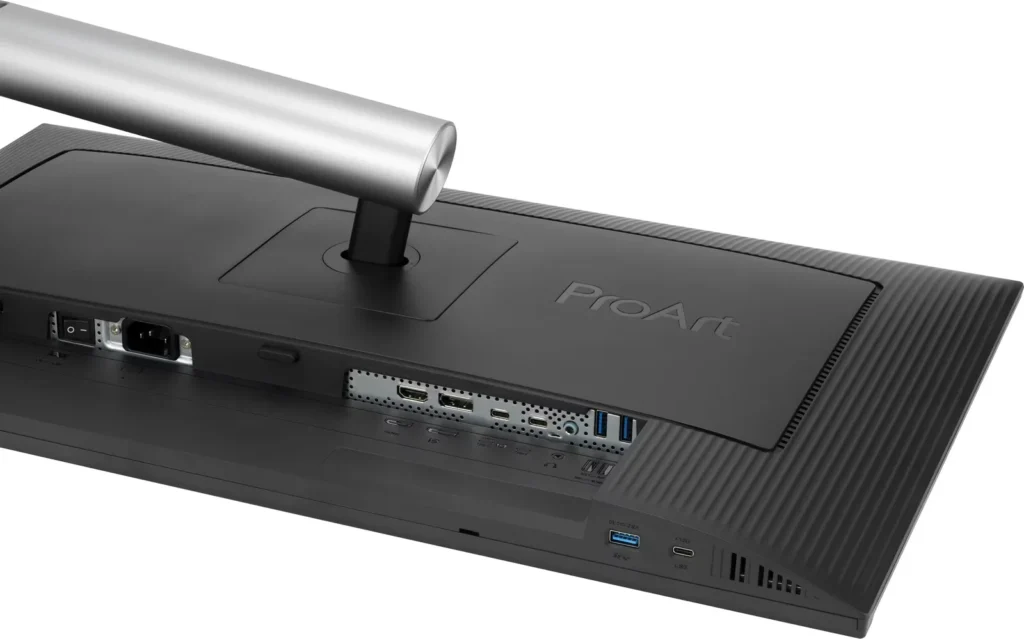
Customer Media
Highlights
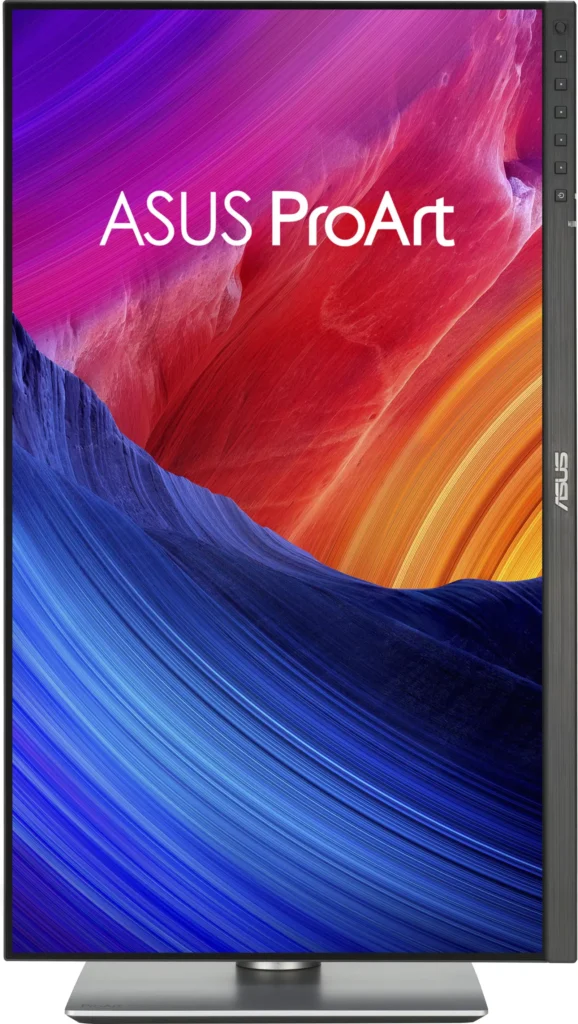
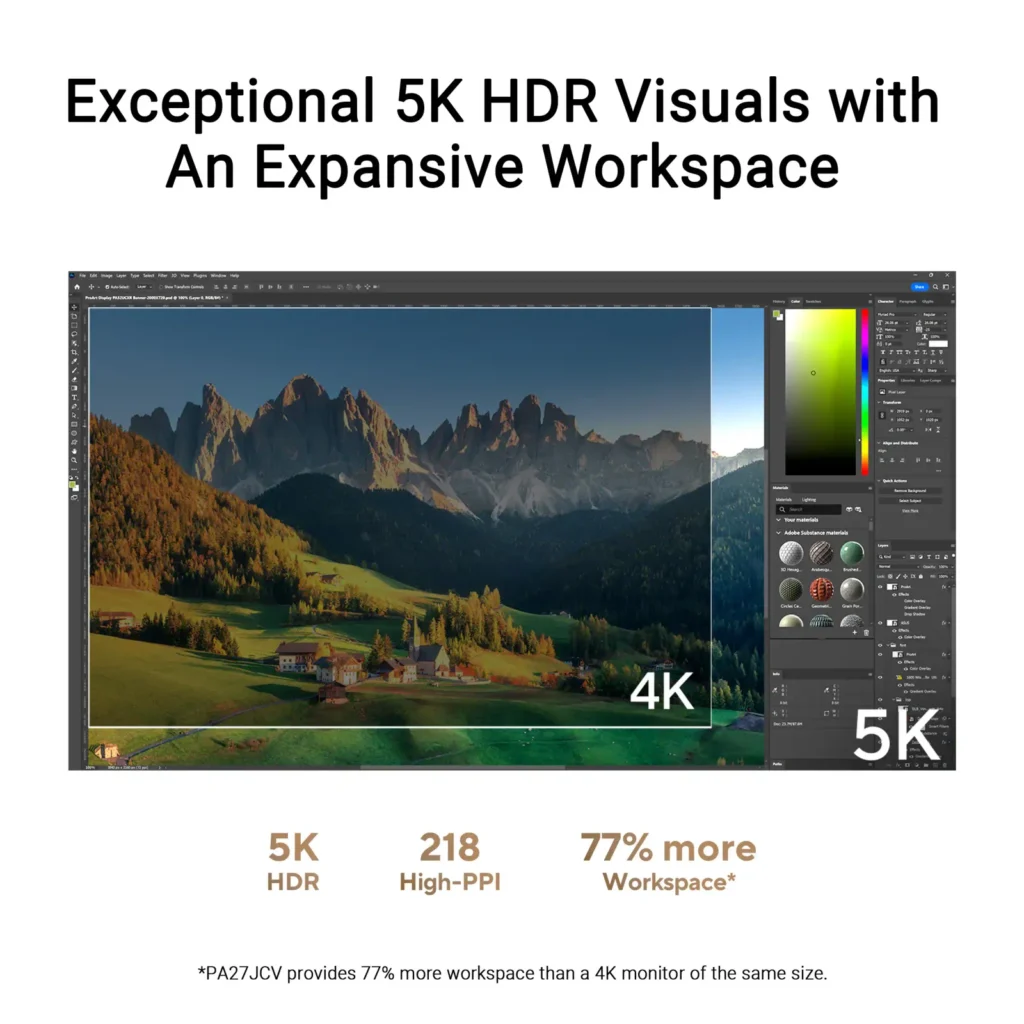
| Stunning 5K Resolution and Pixel Density | The 27-inch 5K (5120 x 2880) IPS panel delivers 14.7 million pixels with a high density of 218 PPI, providing 77% more onscreen space and significantly sharper detail than standard 4K displays. |
|---|---|
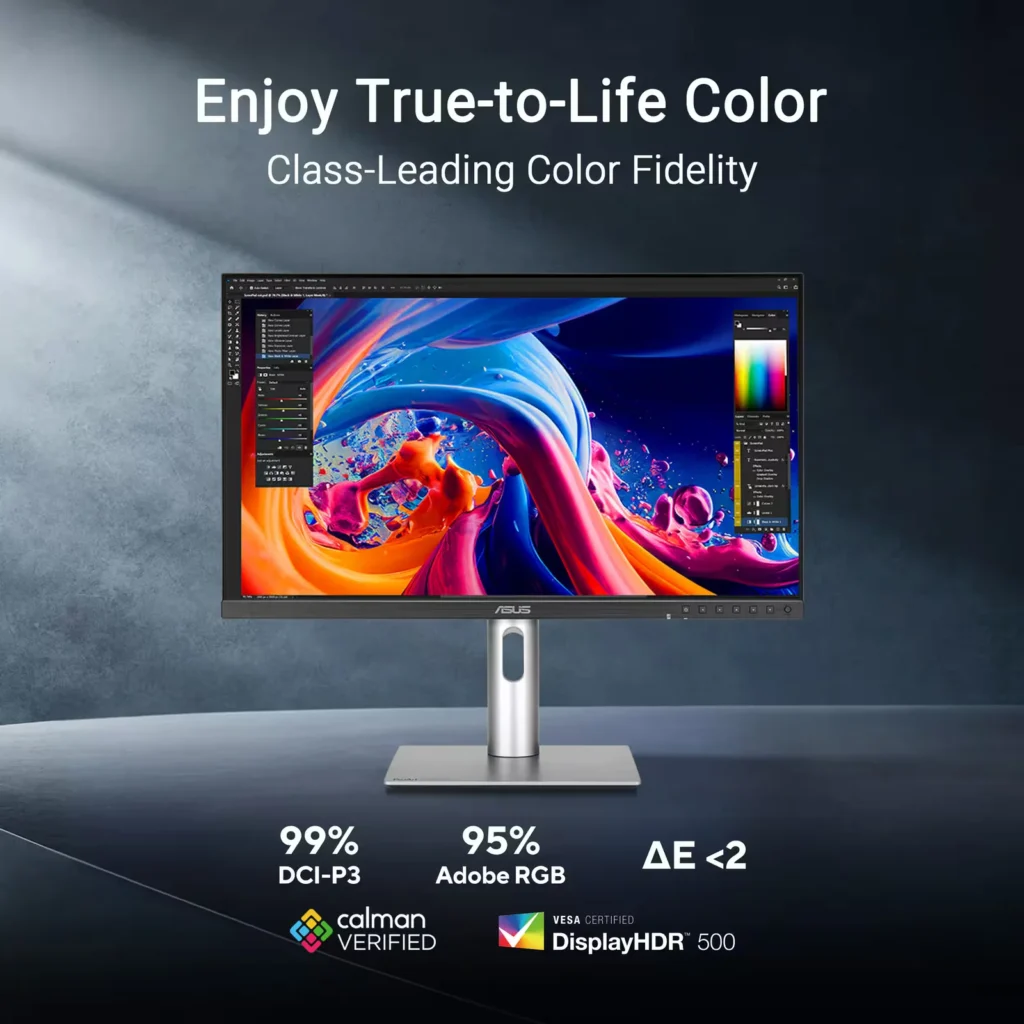
| Professional-Grade Color Accuracy | Factory pre-calibrated and Calman Verified with a Delta E < 2 color accuracy, this monitor covers 99% DCI-P3 and 100% sRGB color gamuts to ensure lifelike color reproduction for demanding creative workflows. |
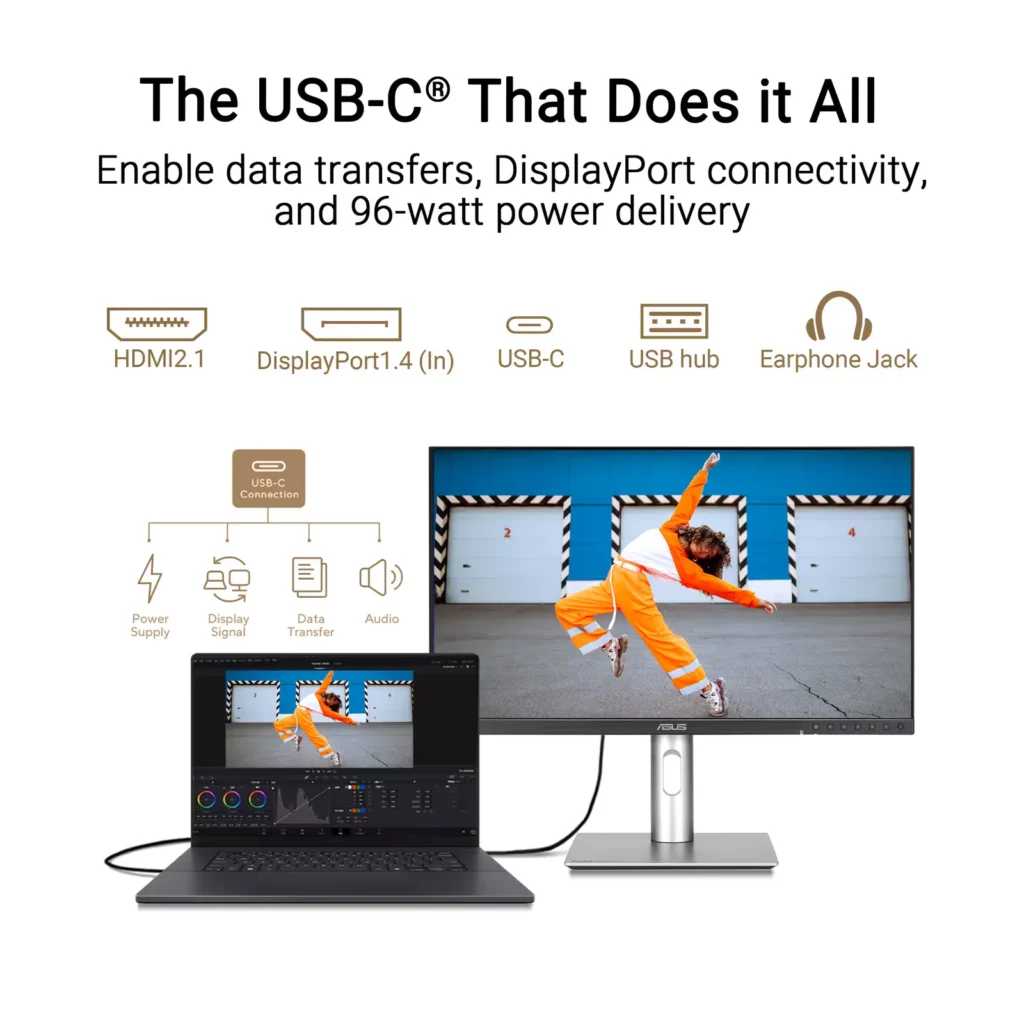
| Powerful USB-C and Auto KVM Integration | Features a full-function USB-C port with 96W Power Delivery, DisplayPort Alt Mode, and data support. The built-in Auto KVM switch allows you to seamlessly control two different devices using a single keyboard and mouse. |
| LuxPixel™ Anti-Glare Low-Reflection Technology | Equipped with a specialized AGLR coating that minimizes distracting reflections and glare while maintaining high color consistency and sharp text clarity, even in brightly lit environments. |
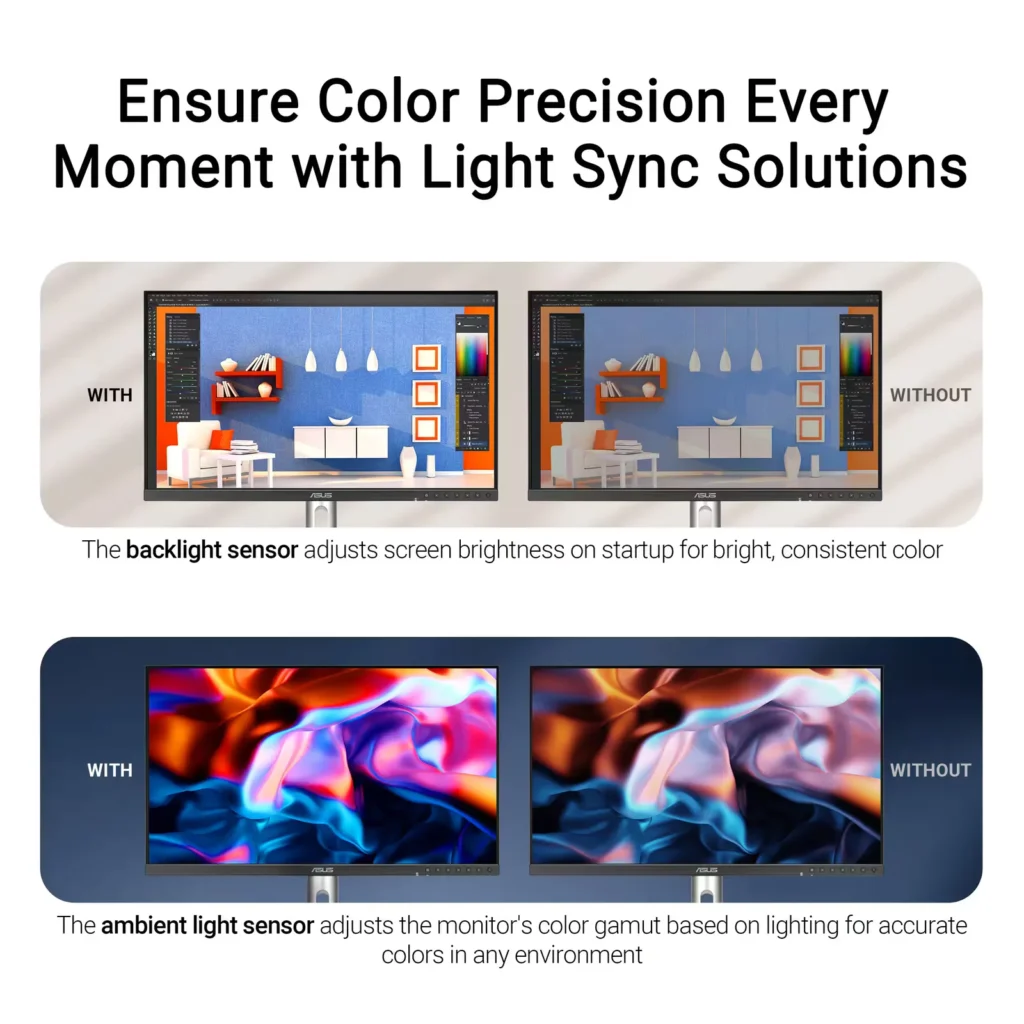
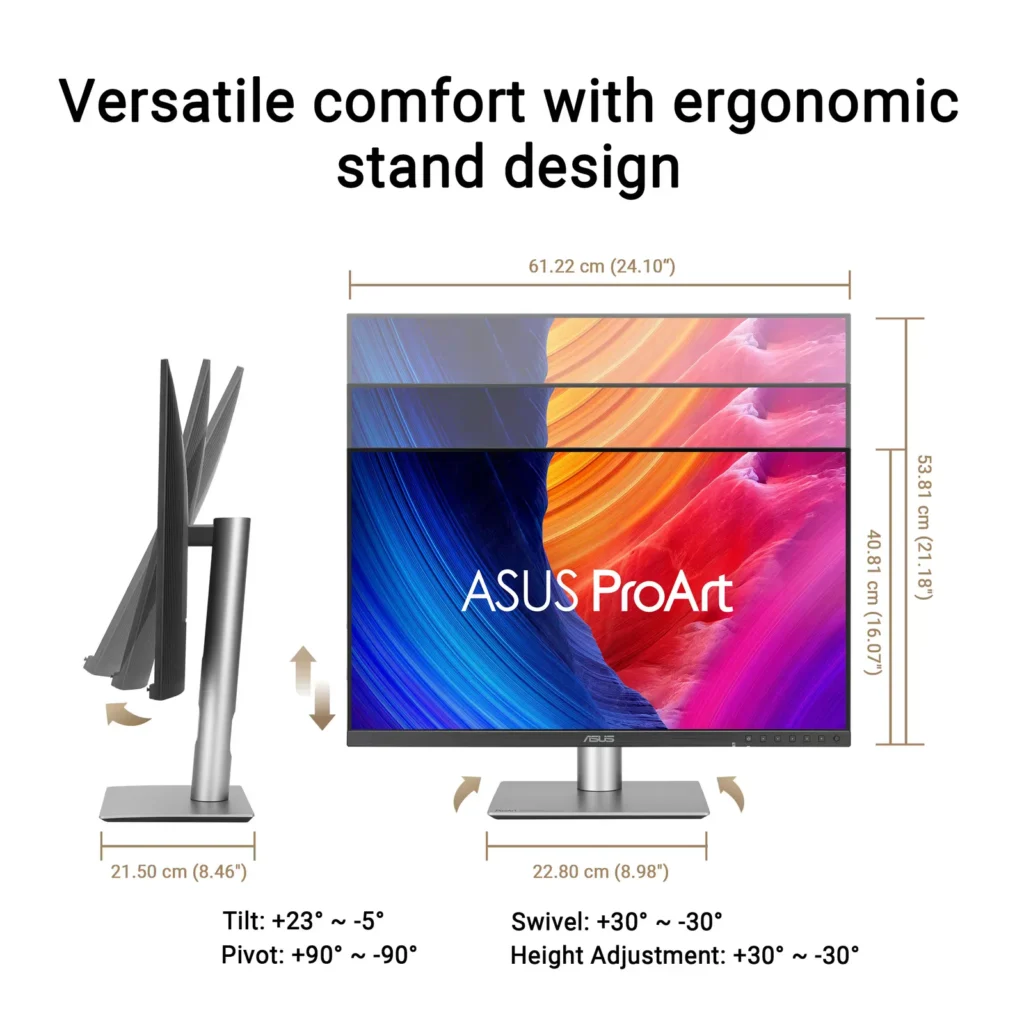
| Advanced Ergonomics and HDR Support | The VESA DisplayHDR 500 certified screen is mounted on a highly adjustable stand offering tilt, swivel, pivot, and height adjustments, complemented by an ambient light sensor that automatically adjusts brightness based on your surroundings. |
Pros & Cons
Pros
- Exceptional 5K Clarity: The 5120×2880 resolution provides incredible sharpness for text and high-resolution media, offering a pixel density that matches premium displays and eliminates the blurriness often found in 4K monitors on macOS.
- Professional Color Accuracy: The display comes Calman Verified with factory calibration reports, delivering true-to-life colors and high coverage of professional gamuts like DCI-P3 and sRGB, which is highly valued by photographers and video editors.
- Versatile Connectivity and Hub: It features a robust port selection including USB-C with 96W power delivery for laptop charging, a built-in KVM switch for managing multiple computers, and easily accessible front-facing USB ports.
Cons
- Hardware Reliability and QC Issues: Multiple reviews highlight serious quality control defects such as dead pixels, screen flickering, and total panel failure with vertical or horizontal lines appearing within a few months of purchase.
- Substandard Audio and Wake Times: The integrated speakers are described as tinny and poor quality, while the monitor is noted for having an annoyingly slow wake-up time when exiting power-save mode or starting up.
- Panel Uniformity and Coating Issues: Users reported noticeable backlight bleed on dark backgrounds, vignetting at the edges, and a matte 'LuxPixel' coating that some found to be too intense, creating a grainy or rainbow-like effect on the screen.
You might also like


Customer Reviews
Showing reviews 61-70 of 103
-
Great for Creatives, but Not a One-Monitor Solutio
nickcal May 5, 2025Review source: BestbuyAs a creative professional, I’ve struggled with finding the best possible monitor to cover all my needs. I usually have my MacStudio connected as well as a gaming tablet. So, for gaming, I want a high refresh rate and for photography and video editing, I want premium color accurancy. For both activities, I need the highest possible brightness level to help with fine details. My current monitor is a 4K display and while it’s been fantastic, I’ve been interested in upgrading to a 5K display. There are a handful of options in the market, but some are extremely pricey. This ASUS ProArt has very similar specs to more expensive competitors, but is it ideal for my purposes?
Refresh Rate Since I would like to have at least a 120Hz refresh rate for gaming, the 60Hz refresh rate that this monitor has is less than ideal. That said, the 60Hz refresh rate is more than adequate for photo and video editing. I don’t do a lot of motion graphics work, but if I did, a higher refresh rate might be beneficial for that type of work, too. For basic non-gaming use, 60Hz is great. At this time, there are no ‘true’ 5K monitors that offer more than 60Hz refresh rate for consumers.
Bezel In general I like the look of the ASUS display, but there is one annoying feature — the bottom bezel. There is a very thin bezel around the top and sides but the bottom of the screen has the ASUS logo and the control buttons on it. While it’s nice to be able to see the buttons on the front, to me, it’s distracting and honestly, just plain ugly to have that size of a bezel on the bottom. I would much rather see something more subtle.
Colors and Brightness This is one area that I really pay close attention to. I plugged my MacBook Pro into the ASUS monitor while my MacStudio was plugged into my 4K display. The 4K display’s colors appeared richer and had truer blacks than the ASUS monitor appeared to have. While the ASUS monitor was brighter, it ended up feeling a bit washed out. That said, I think it’s important to point out that the ASUS monitor is designed for accuracy and prescision while my 4K monitor is an OLED panel and is meant for that ‘wow factor’.
Connectivity
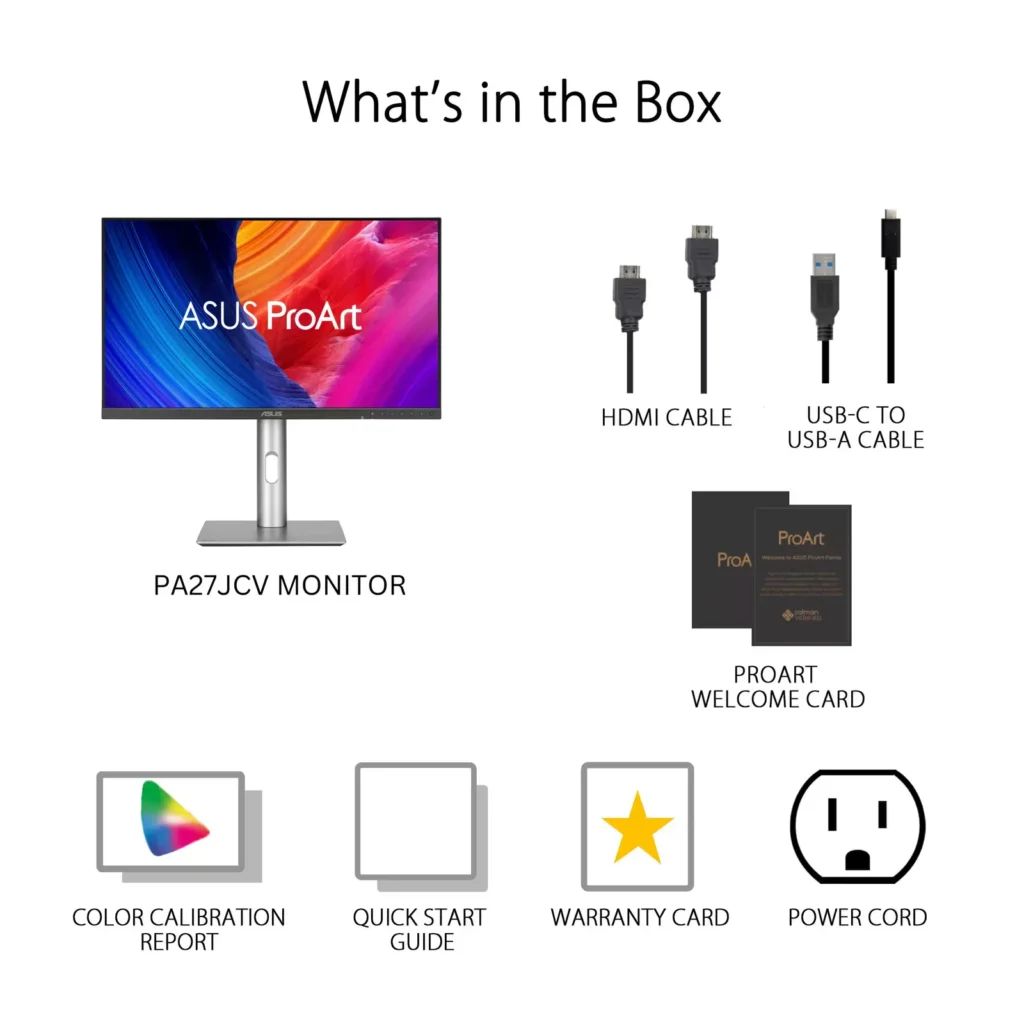
As far as connection ports go, the ProArt offers three options — DisplayPort 1.4 (1), HDMI 2.1 (1), and USB-C, which also provide 96W power delivery. ASUS only included a USB-C and HDMI High-speed cable with the monitor, so I used the HDMI cable as my primary connector. It worked fine, but I did notice that the ProArt didn’t scale icons and text as well as my 4K monitor did.
Final Thoughts
The ASUS ProArt is a solid display choice for creative professionals. It has great color accuracy and comes calibrated from the factory. For me, since I have multiple purposes for my monitor, I will likely use this as a secondary monitor when I need to do color correction on photos or videos.
-
Pretty good!
Verified purchase Verified purchase: This reviewer bought the product.TW May 3, 2025Review source: AmazonNot quite the apple display but half the cost and I do like it. Lost some mac compatibility and not really really bright, but great none the less.
-
Love This Monitor
dharr18 May 2, 2025Review source: BestbuyI absolutely love this monitor. The color is lifelike, vibrant and perfectly reproduced. Refresh is prefect.
I love the controls on the front of the display, they are easy to reach and navigate. The menu ‘joystick’ is a little wonky, it does not perform in the way you would expect. Minor learning curve. To bring up the menu you touch the joystick, push to the right to enter the menu. The joystick does not maneuver until you enter the menu pushing to the right. The initial popup is more of a description of each button. A bad picture is attached to the review.
Setup could not be easier. I had the monitor base and support attached in seconds and the cables connected in minutes. I was up an running in less than 10 minutes.
My only issue was lacking a display port cable. The monitor comes with HDMI and USB type C cables. There is also a power cable included. Your connection options are HDMI (1), USB-C (1 display, 2 for other connections), 3USB, 1 headphone/sound. There is KVM support with the monitor, I have not attempted that setup yet since I don’t have perms on my work laptop. There is also a power button on the back of the monitor, if the front power does not work then
It is highly recommended to download the display widget center, it allows you to control your monitor from the keyboard, change settings, etc without using the on monitor buttons. Personally I like the out of box settings.
The monitor is just fantastic top to bottom. If you are in the market for a great monitor, this is a great choice.
-
Satisfied but no more
Verified purchase Verified purchase: This reviewer bought the product.JonathanC May 2, 2025Review source: BestbuyI have always used Mac but never before a Mac mini. This means I’ve never put any thought at all into screens and just took them for granted. I was very disappointed with my 22 inch generic monitor. There was glare from a nearby window and funky looking text. It was bad enough that I started to do research and this monitor is what I came up with. The text is sharp and looks like I’d expect on Mac and the glare from the window is gone. Visually I’m completely happy. The mediocre rating is because of issues with the USB ports. It seems only one of them works and supplies power. The Internet says there are settings that will solve this problem but when I tried those settings, they made no difference. Because the monitor really has substandard internal speakers, I needed to add an external speaker that charges with USB. There is basically one port to do the job which means the monitor has to connect to the computer via HDMI. I have a functioning screen with an adequate external speaker and am satisfied but feel Asus could’ve done a much better job.
-
Great as a second monitor
MrShinyCadillackness April 30, 2025Review source: BestbuyThis review is written from the perspective of a Mac OS user. As a content creator who edits both photo and video on a daily basis, it is crucial to have a monitor that is not only detailed and sharp, but also boasts a high resolution for today’s demanding media creation. The ASUS ProArt 5K display is a good first step in the right direction for a monitor that wants to compete with the high end Apple Studio Display as a more affordable option for Mac users. While the ASUS ProArt gets many things right, it falls short in a few key areas that I am hoping will be corrected in the next generation of ProArt displays.
***PROS***
The ASUS ProArt is a very beautiful looking high resolution display panel. It is bright and sharp, and boasts 218 PPI pixel density, which matches the Apple Studio Display. This monitor comes pre-calibrated (Calman Verified) right out of the box, and even comes with the calibration certificate so you can see your results for Gamma, sRGB, and DCI-P3 color accuracy. This is a big win for me, as my profession relies on color and image accuracy for final delivery. The blacks and whites, along with 10-bit color depth, and up to 1.07 billion (yes billion), colors make the ProArt display a fantastic addition to my content editing workflow. I am seeing a level of detail that is literally double that of my old QHD display. With the higher resolution and color range, my mirrorless camera images, drone photos, and videos are popping like I’ve never seen before, making color grading even easier, and more precise. The ProArt also uses what ASUS calls a LuxPixel anti-glare coating on the display screen itself, which does a great job of minimizing glare, while also looking extremely bright, vivid, and highly detailed.
The ProArt has several ports on board, including 3xUSB-C, 3xUSB-A, 1xHDMI, 1xDisplayPort, and even a headphone input. One of the USB-C ports on the back is rated for 96W power delivery, so this would be the one to use with a laptop to charge it while in use if running on battery power. Out of all of the available ports, 1xUSB-C and 1xUSB-A are located on the bottom edge of the monitor, making it easy to hook up various devices without having to move the monitor to find an open port on the back. The fact that ASUS have chosen to include this many ports on a monitor is very welcome, and will come in especially handy when using it as a second monitor with a laptop. The ProArt can also be used in vertical display mode if you choose to do so. The buttons on the front bezel, and the on-screen menu system work well together, are easy to use, and intuitive. The monitor stand is also very sturdy and it is easy to adjust the viewing angle to your personal preference.
***CONS***
While the ASUS ProArt has some positives, there is certainly some room to grow with the next generation. I was really excited to jump from a QHD monitor to 5K on my Mac Mini, as this is the resolution that Mac prefers, but I quickly found out that it wasn’t going to work as expected.
As of writing this review, I have not found an easy way to simply scale the display resolution appropriately for text in the Mac display settings. I know the more expensive Mac studio monitor will scale correctly, but the ProArt has trouble scaling text and icons when selecting the full 5K resolution. There are ways to upscale the desktop icons in accessibility settings, as well as resizing the desktop dock, but it still leaves popup windows, drop down lists, and menu bars looking extremely small. There are several resolution options available in display settings ranging from 1152×648 (which no-one will ever use), all the way up to 5K 5120×2880. I have found that I can use 3072×1728 (which is one setting below 5K) semi-comfortably when running applications from my Mac Mini, but again, when selecting full 5K resolution, everything just becomes WAY too small for comfort. This is why I believe it will be a great secondary monitor for programs such as DaVinci Resolve, Lightroom, and Photoshop, which are my apps of choice for daily work. These apps allow you to take advantage of having two displays in your workflow, making it easier to use the ProArt as a secondary monitor in its full 5K resolution for the image editing portion of your software window.
There is an ASUS monitor settings app available called DisplayWidget Center, but it is currently only available for Windows. I am currently using the BetterDisplay app on my Mac, but it also doesn’t allow for proper text scaling when using 5K resolution. It would be nice to see ASUS fully embrace the Mac platform since this is a 5K monitor, and release their app for Mac OS. Maybe then, we will be able to scale correctly.
Lastly, the display does have speakers, but I would only use them for system sounds, or in a pinch if there was no other choice. They are easily the most thin sounding monitor speakers I have ever heard. Since ASUS have included a headphone jack, I would have rather seen them design this without speakers and upgrade a different part of the monitor specs.
***IN CONCLUSION***
The ASUS ProArt 5K display is an excellent looking display. By that, I mean that whatever is being displayed on the screen looks amazing to my eyes. I can’t yet comment on how it displays a windows based machine, but I am sure it will also look amazing, and may even scale up to 5K more appropriately for text and menu items. Until then, I will be using this as a secondary editing monitor in my workflow, and will definitely enjoy it for that purpose. If you have a chance to see this on display at a local Best Buy, I highly recommend you take a look with your own eyes.
-
Amazing 5K clarity and color reproduction
JKinSYR April 30, 2025Review source: BestbuyThis ASUS ProArt 5K 27″ monitor is a beauty. As a content creator and home office user, I was blown away by the precise clarity and color detail provided by the 218 PPI pixel density. While I’m working on my projects the text is sharp, the images are detailed, and the color is accurate.
The LuxPixel technology is a great way to minimize and reduce glare and reflection while I’m working on my projects. This also allows for a nice and wide 178 degree viewing angle. Calman Verified with factory calibration works really well for me right out of the box. Color critical photographers or videographers will appreciate the accuracy of the depth of color. The monitor is easy to use with minimal borders and an easy to use joystick button for menu navigation. The ProArt 5K will support HDR10 and DisplayHDR 500, which gives a nice wide dynamic range for all your HDR content. The display type is an LED display, with an IPS panel. The refresh rate is 60Hz, and it has a 5ms response time.
In regards to the ports and plugs, there is USB-C with 96 watt power delivery which helps for data and video transmission. 1 DisplayPort 1.4 over USB-C, 1 HDMI 2.1 (a cable is provided in the box), 3 USB-A 3.2, 1 USB-C, 1 USB-C 3.2. There is also a headphone jack, but this also comes with built in speakers. The speakers are good and work adequately, but I prefer having an upgraded external speaker setup for my home office needs. Another nice feature is built in Auto KVM that allows for switching between 2 connected PC’s with a single keyboard and mouse. This is great for multi-tasking especially when you’re juggling different types of projects.
I like the stable stand with a metallic silver base and neck as it securely keeps the monitor in place. The monitor will tilt, swivel, and pivot from portrait to landscape mode. The height adjustable neck is very easy to move up and down for your needs. The backlight sensor and ambient light sensor can be helpful to keep pace with the light conditions in your working space. And another nice feature that I have appreciated is the TUV Eye Care that keeps a flicker free and ultra low blue light technology on the monitor screen.
Overall, I really like this monitor for its true niche of content creation and photo/video editing. I think artists will appreciate the colors and precision, but I honestly feel that anyone can benefit from a screen as sharp and precise as this 5K ProArt monitor by ASUS.
-
Promising but came defective
Verified purchase Verified purchase: This reviewer bought the product.Aaron April 30, 2025Review source: BestbuyVery promising but mine came defective. I had black dot in my screen. Attached is the pic.
-
Excellent 5K monitor for Less Than Other Options
BillK April 30, 2025Review source: BestbuyTo find a 5K monitor for less than $100 can only be found with others go on sale. This monitor packs all the visual quality and flexibility for less than $800 without being on sale. I have used other 5K monitors (both PC and Mac) and this one is as quality as those.
Pros:
* Quality screen with 218 pixels per inch. Also includes HDR 10 for additional quality.
* Stand works very well and adjusts up and down as well as tilt. Works as well as other similar models.
* Has a KVM switch included to switch between two monitors. Very nice addition.
* Several connection options (USB C at 98w delivery, display port 1.4, HDMI, 3xUSB 3.2 generation 2) It doesn’t have thunderbolt.
* Many settings and customizations to tweak it.Cons
* Only 60hz refresh rate (but did not see a big issue when gaming)
* Thunderbolt connectivity would have been a good optionI have been using the display port for connection but haven’t used the HDMI but I am sure the quality still stands.
Overall this is an excellent monitor that is well worth the priceRead More
-
Gorgeous monitor
Zaid April 28, 2025Review source: BestbuyThis Asus ProArt arrived in thoughtfully designed packaging; the monitor was well-protected. Having worked from home for years, I’m used to frequently upgrading my setup. Currently, I use a 45″ curved OLED screen that I’m generally very happy with. However, the main drawback of my OLED monitor is text clarity—despite adjusting ClearType settings, text still appears blurry with rough edges.
This Asus ProArt, a 27″ display, is truly a state-of-the-art monitor. Its build quality is impressive, even though it’s primarily made of plastic—it feels premium and well-constructed. The stand is well weighted and keeps the monitor stable without any wobble. Its modern, sleek, and minimalist design also takes less desk space, which I appreciate.
I personally invest in devices that perform well through work, gaming, and media, and this monitor meets all those needs. Regarding its 60Hz refresh rate, most of my gamers are locked to 60fps, which this monitor handles perfectly. It delivers vivid, accurate colors, making 4K videos look stunning. I connected my ROG Ally handheld gaming device to it, and both gaming and movie watching were fantastic experiences.
I also appreciate the wide range of connectivity options, especially the USB-C port that allows for charging and data transfer with a single cable. The on-screen settings menu is user-friendly, and the built-in auto KVM feature is a great addition, allowing me to control two devices with a single keyboard and mouse.
One minor downside for me is the matte screen finish. I personally prefer a glossy finish, as matte screens sometimes create a light-dimming appearance. Nevertheless, the vibrant color reproduction compensates for this, honestly it competes with other high-end monitors out there in the market but at a more affordable price. In addition to its 5K resolution, premium build quality, it has an ergonomic design with flexible viewing angles.
Lastly, while the monitor does have built-in speakers, the audio quality is quite low, so I managed to use external speakers instead. Still, it’s nice that speakers are included at all. -
Great 5K display but still not perfect.
spezaled April 28, 2025Review source: BestbuyI am an owner of the previous 4K Asus ProArt 4K PA279 display and other than Apple laptop connectivity and firmware update issues, it has served me well. Now Asus has this 5K display out at a relatively affordable price as compared to other well-known 5K displays. I do graphic design all day and I was excited to upgrade my existing 27″ screen to 5K for added clarity/resolution. This new Asus PA27 5K monitor is Calman verified and was professionally calibrated before shipping (a Calman verification certificate is included). I love this feature very much as it allows for accurate color representation. That’s very important to my profession, so I gave this Asus ProArt PA27JCV monitor a try.
The monitor was very well packed in its box and set up took about 5 minutes max. The box included the monitor pieces that need to be assembled, a HDMI 2.1 cable and a USB C Display Port cable along with the power cable and a polishing cloth for the screen. The look of the display is altered a bit from the previous version. It has a curved back and it’s very reminiscent to the last Intel iMac models from several years ago. Essentially, it’s more curved and less boxy. There is a metallic base (plastic), a matching cylindrical metallic arm (plastic) and the monitor itself is made from black plastic. It’s not actual metal like the more expensive 5K monitors out there but Im totally fine with these build materials. It looks very nice regardless. The screen has a matte finish versus a glossy finish which I typically prefer. The monitor screen can be raised and lowered, titled up and down and side to side or rotated vertically to be a portrait monitor if needed. It has all the flexibility you’ll probably need. It was easy to fine tune it to the right viewing height for my workstation. It has quite a few connectivity options on the back: (1) Display Port 1.4, (1) HDMI 2.1, 91) USB C Display Port with 96watt pass through, (1) USB C, (2) USB A 3.2 SuperSpeed, (1) 3.5mm headphone plug. The left underside of the monitor has a USB C 15watt port and a USB A 3.2 port that can also power plugged in devices. Luckily, I just needed to use the USC Display Port to get my laptop connected in a flash. There are built in 2W speakers but honestly, they were not that impressive. I will be using external speakers.
After connecting the USB C Display Port cable, I simply arranged the display via my laptop’s display setup and was up and running very quickly. Firstly, this is a 10-bit edge lit LED monitor with a 5ms response time. It does offer HDR if you want to use it. I did elect to use the HDR feature for added pop. Im not sure if that affects the color accuracy but I’ll try it for a while to see. Surprisingly, the contrast ratio is not as impressive as I thought it would be. It’s only 1500:1. The brightness wasn’t as dramatic either. It only provides 600 peak nits of brightness in HDR mode but in standard mode (SDR), it’s 400 nits of brightness. My initial impression was it looked a bit dim but I am sure I’ll adjust to it. Asus states the monitor color volume as 100% DCI-P3 and the pixel density is a very high 218ppi. With all that being said, I did notice the increased resolution from my previous monitor but it wasn’t dramatic. Actually nothing in this new monitor was a really noticeable shift from the older Asus 4K monitor. I will keep tweaking the internal settings via the control buttons located on the front of the monitor and see if I can refine anything further. It’s not bad whatsoever but again, not as dramatic an improvement as I had hoped.
Overall, this Asus PA27JCV is a very fine 5K monitor and is much more affordable that most of the other 5K monitors out there. Set up was easy, build materials are just fine and I see a slight improvement in actually clarity while using it. This new 5K monitor has a matte finish which I typically prefer but I think it may diffuse the resolution a bit. I also have another personal desktop all-in-one computer with a glossy 5K screen and it seems to be sharper. I guess it’s a bit of a trade off with finer detail or less reflectivity. TBH, if you already own an Asus ProArt 4K monitor, I’m still not sure the improvements warrant upgrading. I have enjoyed the previous 4K monitor very much and Im sure this new 5K version will be a fantastic addition to my design tools as well. It’s not perfect, but it will work out very well for my needs and Im excited to see if I can refine it further.Read More